 Skip to content

Television has changed dramatically over the past decade. Gone are the days when you needed a satellite dish or cable box to watch your favorite shows.
Today, millions of people stream TV channels directly through their internet connection. This technology is called IPTV, and it’s transforming how we consume entertainment worldwide.
If you’ve heard the term “IPTV” but aren’t quite sure what it means, you’re in the right place. This guide explains everything in simple terms, from the basic technology to how it actually delivers content to your screen.
Whether you’re in the USA or anywhere else in the world, understanding IPTV helps you make informed decisions about your entertainment options.
What Is IPTV? Breaking Down the Basics
IPTV stands for Internet Protocol Television. Simply put, it’s a system that delivers television content using internet protocols instead of traditional broadcast methods.
Unlike conventional TV that relies on satellite signals or cable infrastructure, IPTV streams content through your internet connection. Think of it like Netflix or YouTube, but for live TV channels and on-demand content.
The technology converts television signals into data packets. These packets travel through your internet connection to your device, where they’re reassembled into the video and audio you watch.
This fundamental difference changes everything about how TV works. You’re no longer limited to scheduled programming or specific geographic locations.
The Three Main Types of IPTV
IPTV isn’t just one thing. It actually comes in three distinct formats, each serving different viewing needs.
Live Television streams broadcasts in real-time, just like traditional TV. You watch programs as they air, from news to sports events. The difference is the delivery method – through internet protocols rather than satellite or cable signals.
Video On Demand (VOD) gives you access to a library of content you can watch whenever you want. Similar to streaming services you already know, VOD lets you choose what to watch and when to watch it.
Time-Shifted TV lets you watch previously aired content. This includes catch-up TV, where you can watch shows from the past week, and restart TV, which lets you restart a live program from the beginning.
Most modern IPTV services combine all three types, giving users maximum flexibility.
How Does IPTV Work? The Technology Explained
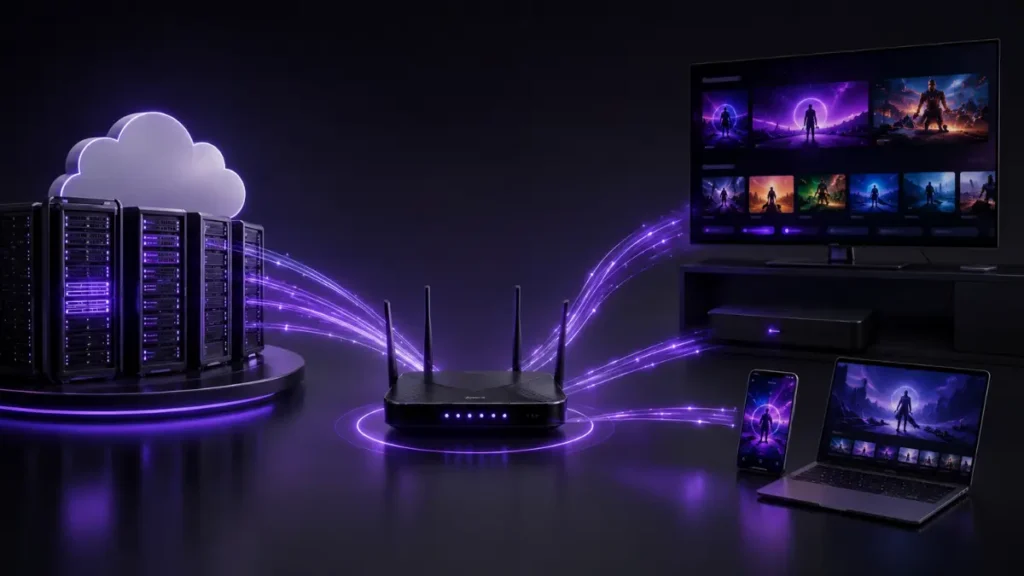
Understanding how IPTV works doesn’t require a technical degree. The process follows a logical sequence from content source to your screen.
The Content Journey
First, the IPTV provider receives content from various sources. These include live broadcast feeds, recorded shows, and movies stored on servers.
Next, the content gets converted into a digital format optimized for internet streaming. This process is called encoding, and it compresses the video to manageable sizes without sacrificing quality.
The encoded content then gets stored on servers or prepared for live streaming. When you request something to watch, these servers spring into action.
Your request travels through the internet to the IPTV provider’s servers. The server then sends the requested content back to your device in small data packets.
These packets travel through your internet service provider’s network, reaching your home router. Your IPTV device or app then reassembles these packets into smooth, continuous video.
The Role of Middleware
Middleware acts as the brain of an IPTV system. It’s the software that connects users with content and manages the entire viewing experience.
This component handles user authentication, content selection, and delivery instructions. It also manages the interactive features you see on screen, like program guides and menus.
Without middleware, IPTV would just be raw data streams with no way to navigate or control them. It’s what makes the system user-friendly and functional.
According to the Federal Communications Commission, internet-based television services have grown significantly as broadband infrastructure improves across the United States.
What Equipment Do You Need for IPTV?
Setting up IPTV is surprisingly straightforward. You don’t need specialized equipment beyond a few basic items most people already own.
Essential Requirements
A reliable internet connection is the foundation of IPTV. The speed you need depends on the quality you want to stream.
For standard definition content, you’ll need at least 3-4 Mbps. High definition requires 5-8 Mbps, while 4K content demands 25 Mbps or more.
These are minimum speeds per stream. If multiple people watch different content simultaneously, you’ll need faster internet to avoid buffering.
You’ll also need a compatible device to display the content. This could be a smart TV, smartphone, tablet, or computer.
Many users prefer dedicated IPTV boxes or streaming devices like Amazon Fire Stick or Android TV boxes. These devices connect to your TV and provide a dedicated interface for IPTV services.
Optional but Helpful Equipment
A wired ethernet connection offers more stability than Wi-Fi. If possible, connect your streaming device directly to your router with an ethernet cable.
This reduces latency and minimizes buffering issues, especially during peak internet usage hours.
A VPN router can enhance privacy and security when streaming. However, this adds complexity to your setup and may slightly reduce connection speeds.
Quality matters with HDMI cables too. If you’re streaming 4K content, make sure your HDMI cable supports the necessary bandwidth.
IPTV vs Traditional Cable and Satellite TV
The differences between IPTV and traditional television go far beyond just the delivery method. Each approach has distinct characteristics that affect your viewing experience.
Flexibility and Convenience
Traditional cable and satellite services lock you into fixed packages. You get predetermined channel bundles whether you watch all those channels or not.
IPTV often provides more customization. Many services let you choose specific channel categories or even individual channels.
Location restrictions disappear with IPTV. While cable and satellite require physical installation at a specific address, IPTV works anywhere with sufficient internet speed.
You can start watching on your TV at home, pause, and continue on your phone during your commute. This mobility is impossible with traditional broadcasting methods.
Cost Structure Differences
Cable and satellite services typically require professional installation, equipment rentals, and long-term contracts. These costs add up quickly.
IPTV generally has lower overhead costs. There’s no satellite dish installation, no cable running through your walls, and often no rental fees for proprietary equipment.
However, IPTV does require a quality internet connection. If you need to upgrade your internet service, factor that cost into your comparison.
Content Delivery and Quality
Traditional TV broadcasts all channels continuously, whether you’re watching or not. This requires massive bandwidth on the provider’s end.
IPTV uses a “unicast” or “on-demand” approach. Content streams only when someone requests it, making the system more efficient.
Picture quality with IPTV can be exceptional, often superior to compressed cable signals. However, it depends heavily on your internet connection’s stability and speed.
Weather doesn’t affect IPTV like it does satellite dishes. Rain fade, a common satellite TV problem, simply doesn’t exist with internet-based streaming.
The Consumer Technology Association reports that streaming technology continues to evolve rapidly, with improvements in compression algorithms allowing better quality at lower bitrates.
How IPTV Handles Live TV and Sports

Live content presents unique challenges for internet-based delivery. The technology behind live IPTV streams differs from on-demand content.
Real-Time Streaming Technology
Live IPTV uses special protocols designed for minimal delay. The goal is keeping the stream as close to real-time as possible.
Despite these optimizations, IPTV typically runs 15-60 seconds behind traditional broadcast TV. This delay results from the encoding, transmission, and buffering processes.
For most content, this delay is barely noticeable. However, if neighbors are watching the same game on cable, they might react to plays before you see them.
Sports streaming requires additional bandwidth and processing power. The fast motion and quick scene changes in sports compress less efficiently than static content.
Adaptive Bitrate Streaming
Modern IPTV services use adaptive bitrate technology. This system monitors your connection speed in real-time and adjusts video quality accordingly.
When your internet speed drops, the video quality automatically reduces to prevent buffering. When speed increases, quality improves again.
This happens seamlessly in the background. You might notice slight quality changes, but you won’t experience the frustrating pauses that ruin live sports viewing.
Multiple quality levels are prepared simultaneously on the server. Your device constantly communicates with the server, selecting the most appropriate stream for current conditions.
Understanding IPTV Protocols and Standards
Several technical protocols work together to make IPTV function smoothly. You don’t need to understand every detail, but knowing the basics helps troubleshoot issues.
Common IPTV Protocols
HTTP Live Streaming (HLS) breaks content into small chunks distributed over standard web protocols. Apple developed this protocol, and it’s now widely adopted.
HLS works excellently across different networks and firewalls because it uses standard web ports. Most devices and platforms support it natively.
Real-Time Streaming Protocol (RTSP) controls streaming media servers. It establishes and manages media sessions between endpoints.
RTSP itself doesn’t transmit the media data. Instead, it works with other protocols that handle the actual video and audio delivery.
User Datagram Protocol (UDP) prioritizes speed over reliability. It sends data without waiting for confirmation that packets arrived.
This makes UDP ideal for live streaming where occasional data loss is preferable to delays. Your brain fills in tiny gaps imperceptibly.
Why Protocols Matter
Different protocols suit different situations. Services choose protocols based on content type, network conditions, and device compatibility.
Understanding which protocol your service uses can help diagnose streaming issues. Some networks or firewalls block certain protocols, causing connection problems.
Most users never need to configure these settings manually. However, knowing they exist helps you communicate effectively with technical support if problems arise.
Benefits of IPTV Technology
IPTV offers several advantages over traditional broadcasting methods. These benefits explain why adoption continues growing globally.
On-Demand Everything
The ability to watch what you want, when you want it, fundamentally changes television viewing habits. You’re no longer bound by broadcast schedules.
Binge-watching entire seasons becomes possible. Pausing live TV, rewinding, and fast-forwarding through content you’ve recorded all happen seamlessly.
This flexibility fits modern lifestyles better than rigid programming schedules. You control your entertainment rather than planning life around TV times.
Multi-Device Compatibility
IPTV works on virtually any internet-connected device. Watch on your big-screen TV, then switch to your tablet in bed, or your phone during lunch.
This device flexibility particularly benefits families. Different members can watch different content simultaneously on their preferred devices.
You’re not limited to one TV with a cable box. Multiple streams can run concurrently, limited only by your internet bandwidth and service terms.
Interactive Features
IPTV enables interactivity impossible with traditional broadcasting. Some services offer multiple camera angles for sports, letting you choose your view.
Interactive program guides provide detailed information about shows, actors, and related content. You can access this information without leaving the viewing screen.
Integration with other internet services creates new possibilities. Imagine checking sports scores, weather, or social media reactions without switching inputs or devices.
Personalization and Recommendations
IPTV systems can learn your viewing preferences and suggest content you might enjoy. This personalization improves as the system gathers more data about your habits.
Traditional TV broadcasts the same content to everyone. IPTV can theoretically customize everything, from advertising to content recommendations, for each user.
Parental controls become more sophisticated with IPTV. You can set detailed restrictions based on ratings, content types, or specific programs.
Common IPTV Setup Methods

Getting started with IPTV involves choosing how you’ll access the service. Several options exist, each with different advantages.
Smart TV Apps
Many modern smart TVs include IPTV apps pre-installed or available for download. This represents the simplest setup method.
You simply install the app, enter your credentials, and start watching. No additional hardware is required beyond your TV and internet connection.
However, older smart TVs might lack the processing power for smooth 4K streaming. App availability also varies by TV manufacturer and model.
Streaming Devices
Devices like Amazon Fire TV, Apple TV, or Android boxes connect to any TV with an HDMI port. They transform regular TVs into smart streaming platforms.
These dedicated devices often provide better performance than built-in smart TV apps. They receive regular updates and typically support more services.
Setup involves connecting the device to your TV and internet, installing necessary apps, and logging in. Most people complete this process in minutes.
Computer and Mobile Viewing
Watching IPTV on computers or mobile devices often requires just a web browser or dedicated app. This simplicity makes it perfect for personal viewing.
Performance depends on your device’s specifications. Older computers might struggle with high-resolution streams, while modern smartphones handle them easily.
Mobile viewing consumes significant data if you’re not on Wi-Fi. A single hour of HD streaming can use 1-3 GB of data, potentially affecting mobile data caps.
For more technical information about internet streaming protocols, the Internet Engineering Task Force maintains comprehensive documentation on standards and best practices.
Internet Speed Requirements for IPTV
Your internet connection speed directly impacts IPTV quality. Understanding these requirements helps prevent frustration and buffering issues.
Speed Guidelines by Quality
Standard Definition (SD) content needs surprisingly little bandwidth. Around 3-4 Mbps provides smooth playback for most SD streams.
High Definition (HD) requires more data. Expect to need 5-8 Mbps for 720p content and 8-10 Mbps for full 1080p HD.
4K Ultra HD streaming demands significantly more bandwidth. Most 4K streams require 25-35 Mbps for consistent quality without buffering.
These figures represent minimum speeds for a single stream. Multiple simultaneous streams multiply the requirements accordingly.
Upload vs Download Speeds
IPTV primarily depends on download speeds since you’re receiving content from servers. Upload speed matters less for typical viewing.
However, if you’re using video chat features or sharing content, upload speeds become relevant. Most residential internet services provide faster downloads than uploads.
Checking your actual internet speed regularly helps identify problems. Your subscribed speed and actual delivered speed sometimes differ, especially during peak hours.
Latency and Jitter
Speed isn’t everything. Latency (ping time) and jitter (consistency) also affect streaming quality.
High latency causes delays between requesting content and receiving it. This particularly impacts live TV and interactive features.
Jitter creates inconsistent data delivery. Even with sufficient speed, high jitter causes buffering and quality fluctuations.
Wired connections typically provide lower latency and jitter than Wi-Fi. Position matters with wireless connections – distance and obstacles between your device and router affect performance.
Buffering and Troubleshooting Tips
Even with good internet, IPTV occasionally experiences issues. Understanding common problems and solutions keeps your streaming smooth.
Why Buffering Happens
Buffering occurs when your device can’t download content fast enough to maintain continuous playback. Several factors contribute to this frustrating problem.
Network congestion during peak hours slows everyone’s connection. Evenings when everyone’s streaming create heavier traffic than midday periods.
Wi-Fi interference from neighboring networks or household devices disrupts data flow. Microwaves, baby monitors, and cordless phones can all interfere with Wi-Fi signals.
Server-side issues at your IPTV provider occasionally cause problems. If their servers are overloaded or experiencing technical difficulties, every user suffers.
Quick Fixes for Common Issues
Restart your router and streaming device first. This simple step resolves many temporary glitches by clearing cached data and resetting connections.
Lower the stream quality manually if automatic adjustment isn’t working properly. Watching in HD instead of 4K might prevent buffering on borderline connections.
Close other applications and devices using your internet connection. Every device sharing your bandwidth reduces what’s available for streaming.
Position your router centrally and elevate it for better coverage. Wi-Fi signals spread outward and downward, so higher placement improves reach.
Long-Term Solutions
Upgrade your internet plan if you consistently experience buffering. Your household’s streaming habits might have outgrown your current speed tier.
Invest in a better router if yours is several years old. Modern routers handle multiple devices more efficiently and provide better range.
Use ethernet cables for stationary devices like smart TVs and streaming boxes. Wired connections eliminate Wi-Fi variables and provide maximum stability.
Schedule bandwidth-heavy activities like large downloads during off-peak hours. This leaves more bandwidth available for streaming when you want to watch TV.
Is IPTV Legal? Understanding the Landscape
Questions about IPTV legality commonly arise. The answer depends on the specific service and how content rights are handled.
The Technology Is Legal
IPTV as a technology is completely legal. The method of delivering content over internet protocols breaks no laws.
Major telecommunications companies and legitimate streaming services all use IPTV technology. These include well-known platforms with proper content licensing.
Legality issues arise not from the technology itself, but from whether the service has rights to distribute the content they’re offering.
Legitimate vs Unauthorized Services
Legitimate IPTV services obtain proper licensing for all content they distribute. They pay content creators and rights holders for permission to stream.
These legal services operate transparently, with clear business information and customer support. They pay taxes and comply with broadcasting regulations.
Unauthorized services lack proper content licensing. They often operate anonymously, offering suspiciously cheap access to premium content.
If a service offers hundreds of channels including premium content for unrealistically low prices, question its legitimacy. Legal content licensing costs money, reflected in subscription prices.
Consumer Responsibility
Users bear responsibility for choosing legitimate services. “I didn’t know” doesn’t provide legal protection in many jurisdictions.
Research any IPTV service before subscribing. Look for company information, licensing details, and user reviews from reputable sources.
Extremely cheap services offering everything are red flags. If something seems too good to be true, it probably is.
Supporting legitimate services ensures content creators get compensated for their work. This funding enables them to create more content you enjoy.
The Future of IPTV Technology
IPTV continues evolving rapidly. Several trends point toward where this technology is heading in coming years.
Integration with 5G Networks
5G mobile networks provide speeds and latency previously available only through wired connections. This enables seamless IPTV streaming on mobile devices anywhere with coverage.
Imagine watching high-quality live TV during your commute without buffering or quality degradation. 5G makes this scenario increasingly realistic.
This mobility extends IPTV’s reach beyond home viewing. Sports fans can watch games in true HD from stadiums, parks, or anywhere they choose.
Enhanced Personalization
Artificial intelligence will make IPTV recommendations increasingly accurate. Systems will understand your preferences better than you do, suggesting content before you search for it.
Personalized interfaces will show different content highlights to different family members. Your teenage son sees different featured shows than your retired mother.
Advertising will become more targeted and potentially less intrusive. Rather than generic commercials, you’ll see relevant ads for products you actually might want.
Interactive and Immersive Features
Future IPTV might integrate augmented reality elements. Imagine seeing real-time statistics overlaid on sports games, or choosing different storylines in interactive dramas.
Virtual reality integration could place you courtside at basketball games or front row at concerts, all streamed through IPTV technology.
Social viewing features will let distant friends watch together with synchronized playback and integrated chat. Geography won’t limit shared entertainment experiences.
Improved Compression Technology
Better compression algorithms will deliver higher quality video at lower bitrates. This means excellent quality even on slower internet connections.
8K content will become more accessible as compression improves. Current 8K streams require 80-100 Mbps, but future codecs will reduce this significantly.
Efficiency improvements benefit everyone. Service providers reduce infrastructure costs, while users enjoy better quality without upgrading their internet plans.
Getting Started with IPTV: Practical Steps
If you’re ready to try IPTV, following a systematic approach ensures a smooth experience from the start.
Assess Your Internet Connection
Test your current internet speed using reliable online tools. Run tests at different times to understand typical performance variations.
Compare your results against the requirements for your desired streaming quality. If speeds fall short, contact your internet provider about upgrade options.
Consider your household’s total internet usage. Multiple people streaming simultaneously, gaming, or video calling all compete for bandwidth.
Choose Compatible Devices
Inventory what you already own. Many people discover they already have IPTV-capable devices without realizing it.
Smart TVs manufactured in recent years typically support IPTV apps. Check your TV’s app store to see what’s available.
For older TVs, streaming devices represent affordable solutions. Research which device best suits your needs and budget.
Research Services Carefully
Read independent reviews from multiple sources. Avoid relying solely on promotional material or single reviews.
Verify that services operate legally with proper licensing. Legitimate services clearly display business information and licensing details.
Consider starting with free trials when available. Testing service quality, content selection, and interface before committing helps avoid disappointment.
If you have questions about IPTV services or need guidance, resources like Strong IPTV 4K provide helpful information for users exploring their options.
Optimize Your Setup
Position your router for maximum coverage. Central locations on upper floors typically provide best results for multi-story homes.
Use ethernet cables for devices that won’t move. This simple step dramatically improves reliability and performance.
Secure your network with strong passwords. IPTV streaming generates significant traffic that others might exploit if your network lacks protection.
Configure quality settings appropriately for your connection. Starting with automatic adjustment lets the system optimize performance, with manual override available if needed.
Common Questions About IPTV Technology
People new to IPTV often have similar questions. Addressing these helps clarify the technology and set realistic expectations.
Can I Watch IPTV Without Internet?
IPTV requires an internet connection by definition. The technology streams content through internet protocols, making connectivity essential.
However, some IPTV systems work on local networks without internet access. These closed systems deliver content within organizations or specific locations.
For home viewing, internet access is mandatory. Downloading content for offline viewing is possible with some services, but initial download requires connectivity.
Does IPTV Work on All TVs?
IPTV works on any TV when combined with appropriate devices. Smart TVs often include built-in IPTV apps, while older TVs need external streaming devices.
The TV needs an HDMI input for most streaming devices. Nearly all TVs manufactured in the past 15 years include HDMI ports.
Very old TVs might require special adapters. However, given IPTV’s quality capabilities, using it with outdated displays wastes the technology’s potential.
How Many Devices Can Stream Simultaneously?
Simultaneous streaming limits depend on two factors: your internet speed and your service terms.
Technically, bandwidth determines how many quality streams your connection supports. Divide your download speed by requirements per stream for a rough estimate.
Service agreements often limit simultaneous streams regardless of bandwidth. Check terms carefully – some allow 1-2 streams, while others permit more.
Exceeding either limit causes problems. Bandwidth exhaustion creates buffering, while violating service terms might trigger account restrictions.
What Happens If My Internet Goes Down?
IPTV stops working when internet connectivity fails. Unlike traditional cable or satellite that operates independently, IPTV depends completely on internet access.
Downloaded content might remain available depending on the service and app. Some platforms allow offline viewing of previously downloaded shows and movies.
Internet reliability matters significantly for IPTV users. Consider this when evaluating whether IPTV suits your household.
IPTV Around the World: Regional Differences
IPTV adoption and implementation vary globally. Different regions face unique challenges and opportunities with this technology.
North American Market
The United States and Canada have extensive broadband infrastructure supporting IPTV growth. High internet penetration rates make IPTV accessible to most households.
Major telecommunications providers offer IPTV services alongside traditional cable options. This competition benefits consumers through improved services and pricing.
However, rural areas with limited broadband access face challenges. IPTV requires consistent speeds unavailable in some remote locations.
Cord-cutting trends accelerate IPTV adoption. Younger demographics particularly favor flexible, internet-based viewing over traditional cable subscriptions.
European Adoption
European countries show varied IPTV adoption rates. Western European nations with excellent internet infrastructure lead in IPTV usage.
Regulatory environments differ by country. Some nations strictly enforce content licensing, while others have less comprehensive enforcement.
Language diversity creates unique content challenges. IPTV services must navigate multiple languages and regional preferences within relatively small geographic areas.
Developing Markets
Emerging markets often leapfrog traditional cable infrastructure, moving directly to IPTV. Mobile internet expansion particularly drives this trend.
Lower costs make IPTV attractive in price-sensitive markets. Building internet infrastructure costs less than installing cable to every household.
Content availability sometimes lags behind technological capability. Licensing challenges and local content production capacity affect service quality.
Mobile-first viewing dominates in many developing regions. IPTV services optimize for smartphone viewing rather than traditional TV screens.
For support and additional information about IPTV services worldwide, you can reach out through WhatsApp to connect with knowledgeable representatives.
Conclusion: Is IPTV Right for You?
IPTV represents a fundamental shift in television technology. Understanding what is IPTV and how it works empowers you to make informed entertainment choices.
The technology offers undeniable advantages: flexibility, convenience, and control over your viewing experience. Multi-device compatibility and on-demand access align with modern lifestyles.
However, IPTV isn’t perfect for everyone. It requires reliable, fast internet that isn’t available everywhere. Complete dependence on connectivity means outages eliminate your TV access.
Consider your specific situation. Evaluate your internet quality, viewing habits, and household needs before committing to IPTV.
Research services thoroughly, prioritizing legitimate providers with proper content licensing. Supporting legal services ensures quality content continues being created.
The future of television clearly includes IPTV technology. Whether as your primary TV source or complementing traditional services, understanding IPTV helps you navigate the evolving entertainment landscape.
Start small if you’re uncertain. Try services with free trials, test your internet capabilities, and gradually transition as you become comfortable with the technology.
IPTV isn’t just a trend – it’s television’s evolution. Understanding it positions you to take advantage of current offerings and future innovations.
